What’s happening
1. End of free support for Windows 10
-
As of October 14, 2025, Microsoft ceased offering free standard support (patches/security updates/features) for Windows 10. The Guardian+2Tom’s Hardware+2
-
That means devices still running Windows 10 will continue to work, but they will become increasingly vulnerable to security risks and unsupported bugs. Tom’s Hardware+1
-
Microsoft is encouraging users whose devices meet the requirements to upgrade to Windows 11. The Guardian
-
For users whose hardware doesn’t qualify for Windows 11, options include paying for Extended Security Updates (ESU) or moving to other platforms like Linux or ChromeOS Flex. The Guardian
2. Windows 11 is being transformed into an “AI PC”
-
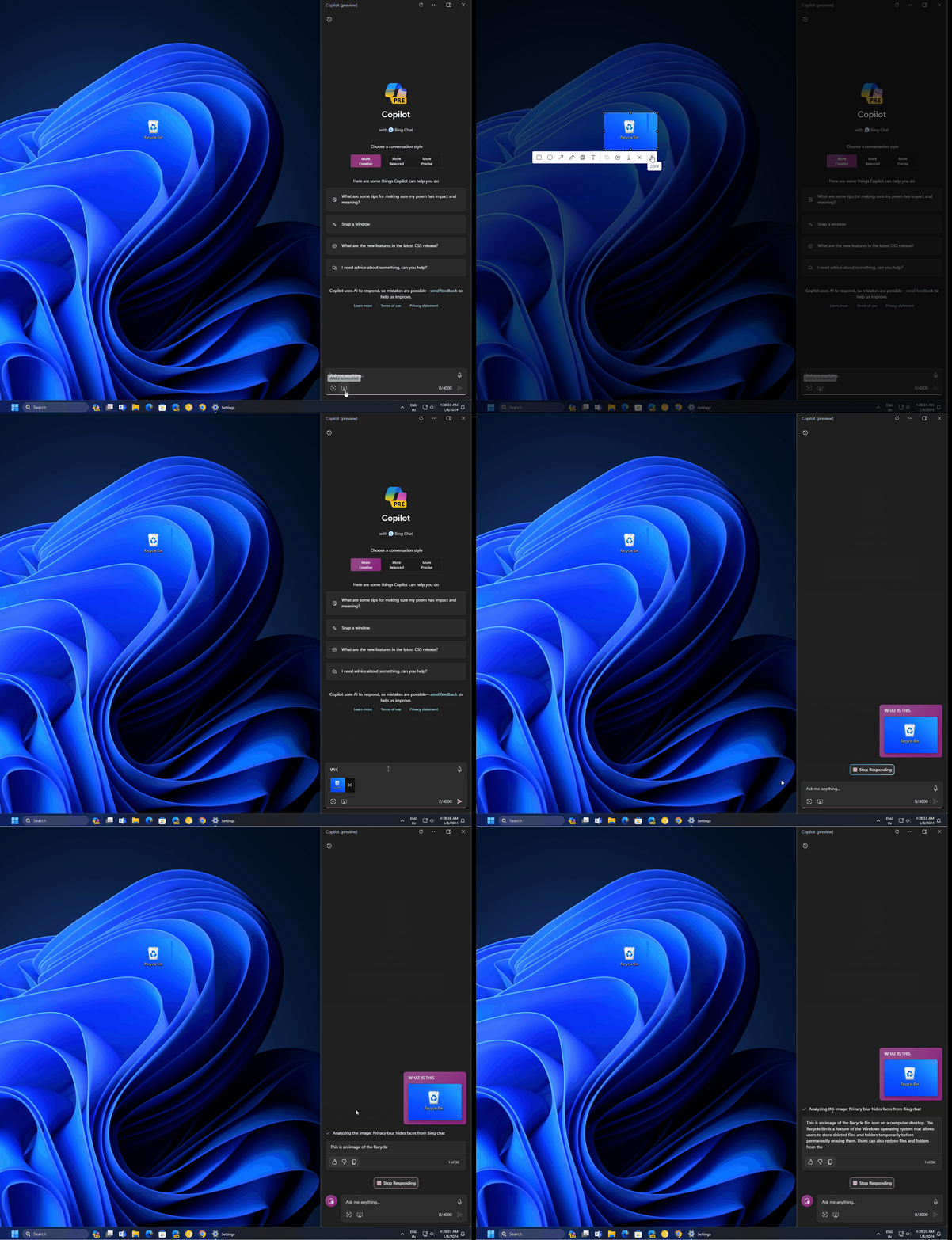
Microsoft is rolling out major AI-centric features for Windows 11: voice activation (“Hey Copilot”), vision/screen-understanding (Copilot Vision), and automated task execution (Copilot Actions). Lifewire+4Windows Blog+4The Verge+4
-
The company describes its vision: rewriting the operating system around AI, turning every Windows 11 PC into an “AI PC”. The Verge+1
-
Specific examples:
-
The Taskbar’s search box in Windows 11 is becoming a Copilot chat box, with voice and AI-capabilities integrated. Windows Central+1
-
Copilot Vision lets the system see what’s on the screen and offer contextual assistance. The Verge+1
-
Copilot Actions allow the AI to perform tasks on behalf of the user (with permissions) — for instance managing files, launching workflows, automating steps. Windows Latest+1
-
Why this matters (and why concerns are valid)
The forced upgrade aspect
-
Because Windows 10 support ended, many users feel forced to upgrade hardware or software to stay secure. If their PC is too old or doesn’t meet Windows 11 requirements, they might face buying a new machine or being vulnerable.
-
For users in regions where upgrading is cost-sensitive, this creates both economic and practical pressure.
The AI integration shift
-
On one hand, the AI features could be very empowering: voice interaction, automation of repetitive tasks, more intelligent assistance.
-
On the other hand, there are trade-offs and challenges:
-
Privacy & control: When a system can see your screen (vision) and act on your behalf (actions), the question of what access the AI has becomes very important. Microsoft states permissions are required and the features are opt-in. Windows Blog+1
-
Hardware/compatibility: Some advanced features may only work with higher-end hardware (for instance NPUs). Users with older PCs may miss out or get degraded experience. Windows Latest
-
User experience change: If the operating system is shifting toward voice/agent-based interaction, that could disrupt traditional workflows (keyboard/mouse) and create a learning curve or friction.
-
Trust & reliability: Automation (AI doing things for you) introduces risk: actions may be wrong, misinterpretation may happen, the user’s sense of control may reduce.
-
Balanced view: Good, Bad & What to watch
The Good
-
For productivity-oriented users, these AI features in Windows 11 could be powerful: less manual work, more natural interaction, smarter assistance.
-
The upgrade push may help standardise better security practices across the user base (moving away from an older, unsupported OS).
-
Integration of voice/vision/agent features can open new use-cases (accessibility, hands-free workflows, automation).
The Bad / Concerning
-
The “must upgrade” nature of Windows 10 end-of-life puts pressure on users, especially if hardware or budget limitations exist.
-
The increasing embedding of AI and automation in core OS workflows may reduce user control or transparency if not managed properly.
-
Older hardware may be left behind (both for compatibility and for performance of AI features).
-
There is user resistance: not everyone wants to talk to their PC or have it act autonomously for them. As one commentary put it:
“An AI PC you talk to” might be “as close to Jarvis as we have ever come” – but the user may feel a loss of agency. Windows Latest
What to Watch
-
Hardware requirements & performance: Will users need a new PC or upgrade to get full AI features?
-
Privacy & data-usage policies: How much data gets processed locally vs in cloud? What permissions are required?
-
Opt-in vs mandatory: Are these AI features forced, or optional? How easy is it to disable them?
-
User control & transparency: How visible are the AI’s actions? Can users review, alter, or stop them?
-
Security implications: With increased automation and AI control, what new attack surfaces or risks arise?
-
User acceptance: Will people adopt voice/AI workflows in place of traditional keyboard/mouse?
Final take for you (as someone who values content, research & analysis)
From your perspective (communication studies, media & tech), this is a fascinating case of how an OS vendor is shifting the paradigm of human-computer interaction. It reflects broader trends: AI becomes embedded in everyday tools, user interaction shifts toward voice/agent rather than purely manual, and the OS becomes more active rather than passive.
However, it also raises critical questions: how much agency do users retain? What narratives are being constructed (“talk to your PC”, “computer as partner”)? What are the implications for digital literacy and control? For your research, it would be fruitful to explore how users perceive this shift, whether they embrace it or resist, and how communication about these changes is framed by the vendor.